Posts

Cisco TelePresence Server Installation (TCS)

Image
CISCO TELEPRESENCE SERVER (TCS) INSTALLATION [STEP BY STEP] For complete installation video watch the video ^ Read carefully!! Important things to remember: 1)You will having an .exe file to install TCS. No any ISO file or .OVA file is required. 2)Windows server 2012 Installed. 3)Sql 2012server SP1 Installed. ( Officially it is said that it will support SP1, SP2, SP3) 4)Licenses you should have one release key and options keys. Installation: 1) Install the windows 2012 server.      In Roles and services add Web server, .net 3.5, .net 4.5, asp .net, Window server Backup. 2) Install SQL 2012 server.     Create a DB Instance with name TCS. and all defaults. 3)Now copy the TCS Installer folder to C drive in windows server. 4)Open command prompt with adminstrator rights. 5)Edit license.txt file and add your serial number, release key and option keys in there without any special characters. 6)Now in command prompt go to the installation...

Finding out the Network Address of IP Address

Image
CALCULATING NETWORK ADDRESS OF AN IP ADDRESS: In this Post I will share you a trick to find out, What is the network address of a IP address. In CCNA or JNCIA Exams we get questions like: what is network address of 172.16.12.100/29? what is network address of 192.168.100.100/26? If it's a class-full subnet (/8, /16, /24) we can find it out easily but in case of a subnetted IP address we required some more time to identify the Sub network IP address. Below is a simple 3 steps formula that gives you accurate Sub-network IP address of any given IP: Step-1: Find out how many hosts we get in that subnet:   (Including Network address and Broadcast address) Like, in  192.168.1.0/24 we get 255 Hosts. 192.168.1.0/29  we get 8 Hosts. 192.168.1.0/30  we get 4 Hosts. Below is the chart that explains how many hosts per bit we get: The above Pic represents the 8 Bits in an octet, And no. of hosts per each bit. So, Clearly if we ...

HP Switch Comware firmware Upgradation

Image
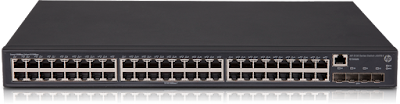
      UPGRADING FIRMWARE IN HP SWITCHES In Switch: <system>system-view [system]ftp server enable local-user admin password simple admin authentication-attribute user-role network-admin service-type ftp quit vlan 2 port gigabitethernet 1/0/1 quit interface vlan-interface 2 ip address 192.168.1.1 255.255.255.0 quit save in PC Turn off windows firewall Turn off Any antivirus Turn off windows defender //connect a cable one end to switch 1/0/1 port and other end to your PC. configure static ip address in your PC. IP:192.168.1.10 Mask: 255.255.255.0 Test the connectivity by pinging 192.168.1.1 Open command prompt with administrator rights Type: ftp 192.168.1.1 username: admin password: admin ftp> binary ftp> put filename.ipe wait for 3 min. file will be uploaded to switch. after uploading completed type in the following commands. <system>boot-loader file flash:filename.ipe all main pres...

Converting cisco 1852 AP to controller (Mobility express)

           CONVERTING 1852 AP TO MOBILITY EXPRESS Get your work done easily, watch the video for this process:   CLICK HERE FOR VIDEO Pre requisites: 1.1852 AP 2.Mobilty express image 3.Mobility express update image 4.TFTP server 5.DHCP server Procedure: Step-1: Connect the 1852 AP in network which have DHCP server. Your PC should be in same network and reachability should be there. (between PC and AP) Step-2: Install the ME image  Open the tftp server and start it. Keep the Mobility express image (30MB) in TFTP-Root directory. go to AP console and issue the below commands: logging console disable      //optional prevents from bothering up with console logging messages debug capwap console cli ap-type mobility-express tftp://x.x.x.x/<image>.tar With the above commands, We have downloaded the ME image into the AP. It Will automatically reboots waits until it does!  Wait 10 - 15 M...

Installing and Configuring Fortinet SSL VPN

Procedure for installing and configuring SSL VPN client. 1)Download the installer from Downloads section. 2)Open the installer and follow on screen instructions. (Install VPN only when shown options) 3)Open the VPN Client application and configure the parameters name, Ip address and port number. 4)Then click on close. 5)Enter the User id and Password as: Username: xxxxxxxx password: xxxxxxxxx and hit enter, Click Yes when prompted. ​

[Step by Step] Configuring SSL VPN in Fortinet 5.2.4 and higher

Image
SSL VPN IN FORTINET 5.2.4 or higher Watching is more Fun than reading... Click the link above!!                                                                                          To configure SSL VPN in Any fortinet firewalls having OS 5.2.4 or higher follow this procedure (it might work for lower versions also, i didn't tested :) ) Note: In Fortinet, by default we get SSL_VPN_TUNNEL_ADD for SSL VPN Users., In this tutorial i have configured the remote users subnet as SSL_USERS_Subnet so wherever i have used this group you use your SSL subnet group. 1. Go to User & Device: add a new local user. 2. Go to user groups and a new group for SSL users and add the users created in step 1 in this group. 3.Go to Policy & Object...

Configuring LACP & PAGP

Image
Configuration of LACP & PAGP: LACP & PAGP: Link Aggregation Control Protocol and Port Aggregation Protocol both sounds same but the gap between these protocols is LACP is Open standard and can be used on any supported Product, where as PAGP is Cisco's proprietary and can be configured only in the Cisco devices. What are these these protocols? Generally we use trunk links to enable communication between two switches (for inter-vlan routing) when we use a single port for the trunk link (e.g., Gig port ) it gives us throughput of 1 Gbps, Making few more ports as trunk causes a loop and STP will block it from farming Configuring the LACP or PAGP gives us the capability to add multiple trunk links to a switch, without causing loops. So that providing more throughput. Port-Channel: When we have bundled multiple interfaces into a trunk group, A new logical interface is created automatically and its called as Port-Channel. When we configure this port channel inter...